This page is sort of outdated, it was the original way I was developing and deploying the website. It was originally called "This Website" and I was discussing how I built this website. I now use Obsidian to publish this site: Using Obsidian, Quartz, and Github Pages to Setup a Simple Static Website. Here is the link to my old website if you are curious.
This website is built with Hugo, using the Terminal theme.
Hugo takes Markdown files and turns them into static web pages. It was written in Go and it’s a great way to develop a great personal website that has simple navigation, tagging features, and easy to use themes.
For my site I went with the Terminal theme. I also decided to use the yaml format for the syntax files. For that, I renamed the default hugo.toml file to hugo.yaml and changed the syntax to the yaml format.
Usual setup for a project looks something like this:
hugo new site quickstart && cd quickstart
git init
git submodule add https://github.com/theNewDynamic/gohugo-theme-ananke.git themes/ananke
echo "theme = 'ananke'" >> hugo.yaml
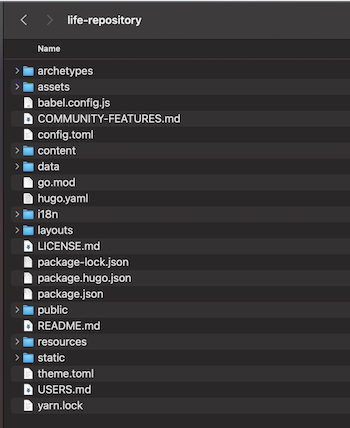
I ran into some issues using this method when it came to deploying the site to GitHub. Therefore I decided to go with a different method for implementing the theme. Which was copying the files from the theme folder into the base directory:
Warning
This method does work, however if you want to change the theme at some point it becomes more difficult than just changing it in the hugo.yaml file.
The next step was to implement a simple menu system for the website’s navigation:
menu:
  main:
    - name: Home
      url: "/"
      weight: 1
    - name: Traveling
      url: "/traveling/"
      weight: 2
    - name: Music
      url: "/music/"
      weight: 3
    - name: Cooking
      url: "/cooking/"
      weight: 4
    - name: Programming
      url: "/programming/"
      weight: 5
    - name: Outdoors
      url: "/outdoors/"
      weight: 6
    - name: Places
      url: "/places/"
      weight: 7
I applied the following code to the hugo.yaml file to center the page on the screen:
centerTheme = "true"The last thing I added was a taxonomy called places to be able to organize my posts by location/state. This is also done inside the hugo.yaml file:
taxonomies:
	category: categories
	place: places
	tag: tags
Finally, to run the website locally on your machine you can run the following code:
hugo server --buildDraftsNote
I used the option —buildDrafts to build all blog posts no matter what the status of the draft property is in the file.*
Also, you can set the draft property to true so your post isn’t live until you change the value.
draft: true